Advanced Search Techniques to Supercharge Your Google Books Experience
Discovering the vast world of digital reading has never been easier, and Google Books stands out as the premier e-book library solution. With millions of titles at your fingertips, from classic literature to cutting-edge research papers, Google Books offers an unparalleled e-book library experience. Whether you're a student, researcher, or avid reader, mastering advanced search techniques can transform your browsing from ordinary to extraordinary. In this comprehensive guide, we'll dive deep into powerful strategies to supercharge your Google Books experience, helping you uncover hidden gems and precise matches effortlessly.
Why Google Books is the Ultimate E-Book Library
Before we jump into the techniques, let's highlight why Google Books reigns supreme in the e-book library niche. Unlike other platforms, Google Books provides free access to full texts, previews, and scanned pages from physical books worldwide. Its integration with Google's powerful search engine means lightning-fast results, and features like personalized recommendations make it a go-to for every reader. Positioned as the best e-book library, Google Books combines breadth, depth, and usability, making it indispensable for anyone serious about digital reading.
Mastering Basic Refinements in Google Books Search
Start with the fundamentals to build a strong foundation. When using Google Books, the search bar is your gateway. Enter keywords, but refine immediately using filters on the left sidebar. Select "Any books," "Preview available," "Full view only," or "Free Google eBooks" to narrow results. For instance, searching "quantum physics" and filtering for "Full view only" ensures you access complete texts without paywalls.
Pro tip: Use the "Sort by" dropdown to prioritize relevance, date, or ratings. This simple step supercharges your Google Books e-book library hunts, saving hours of scrolling.
Language and Publication Date Filters
Tailor your e-book library quest by language. Click "Any language" and choose from over 100 options, perfect for multilingual readers. Set publication dates via "Custom range" – search books from 1800-1900 for historical insights or post-2020 for the latest trends. These filters make Google Books the smartest e-book library for targeted discovery.
Harnessing Boolean Operators for Precision Searches
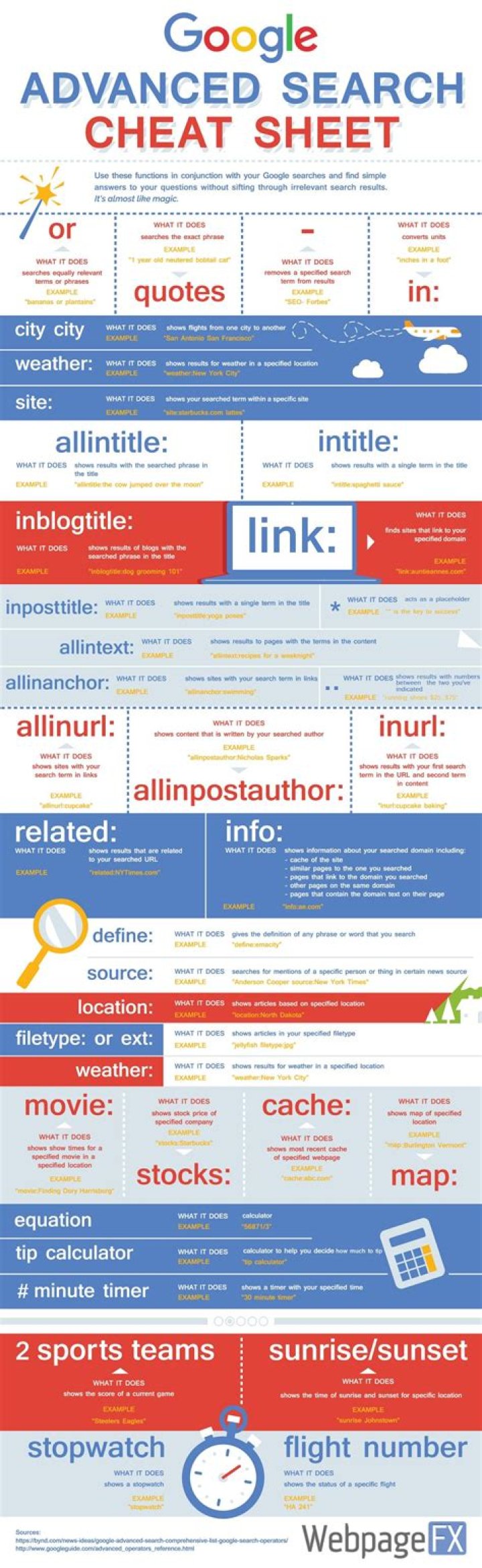
Boolean operators are game-changers in Google Books. Use quotes for exact phrases: "machine learning algorithms" yields precise hits, avoiding scattered results. The AND operator (implicit in spaces) combines terms, but explicit use clarifies: "climate change AND policy."
Exclude irrelevancies with minus: "artificial intelligence -fiction" focuses on non-fiction. OR broadens: "Python OR Java programming." Nest with parentheses: "(solar OR wind) energy efficiency." These techniques position Google Books as the superior e-book library for researchers needing accuracy.
Advanced Boolean Combinations
Combine with wildcards: "organizational* behavior" matches variations like "organization's." Proximity searches aren't native, but phrase quotes approximate them. Experiment in Google Books' search bar – results update live, refining your e-book library mastery.
Leveraging Subject and Category Filters in Google Books
Google Books categorizes millions of titles meticulously. After searching, use "Subjects" on the left to drill down: from "Computers > Programming" to "History > Ancient." Stack multiple subjects for intersections, like "Fiction > Mystery" AND "Women authors."
This feature shines in the e-book library niche, as Google Books draws from Library of Congress classifications, ensuring authoritative groupings. Authors and publishers filters complement this – search "Jane Austen" under "Romance" for curated lists.
Customizing with Multiple Filters
- Combine subjects with dates: Victorian literature post-1850.
- Layer authors: Shakespeare AND "tragedies."
- Publisher focus: Harvard University Press for academic goldmines.
These layers make Google Books your ultimate e-book library powerhouse.
Exploring Advanced Search Page Features
Unlock the full potential via Google Books' Advanced Search (gear icon or books.google.com/advancedbooksearch). Here, input words in title, author, or ISBN fields separately. Specify "with all of the words," "with the exact phrase," or "with at least one."
Exclude terms precisely, and filter by language, date, or even page count. ISBN searches are gold for rare editions. This page supercharges Google Books as the best e-book library for meticulous queries.
ISBN and OCLC Numbers Mastery
Use ISBN-10 or ISBN-13 for exact book matches, ideal for buying or citing. OCLC numbers track library editions. In Google Books, these pull metadata-rich results, enhancing your e-book library experience.
Utilizing Google Books Ngram Viewer Integration
While not direct search, Ngram Viewer (books.google.com/ngrams) analyzes word trends across Google Books' corpus. Search phrases to see usage over time – perfect for historical linguistics. Link back to books via results, enriching your e-book library research.
For example, compare "big data" vs. "data science" spikes, then dive into source books in Google Books. This unique tool cements its status as the top e-book library.
Personalization and Saved Searches in Google Books
Sign into your Google account for magic. Save searches, create bookshelves, and get alerts for new matches. "My library" organizes finds, with ratings and notes. Export citations in MLA/APA – invaluable for academics.
Recommendations evolve with your history, making Google Books a personalized e-book library par excellence.
Bookshelves and Sharing
- Create public/private shelves: "Sci-Fi Favorites."
- Share lists via links.
- Collaborate on group shelves.
Mobile and API Enhancements for Google Books
The Google Books app (iOS/Android) mirrors web features with voice search and offline previews. Scan ISBNs via camera for instant lookups. For power users, the API allows programmatic searches – integrate into apps or workflows.
Query parameters like "intitle," "inauthor" mimic advanced ops: books.google.com/books?q=intitle:odyssey. This extensibility positions Google Books ahead in the e-book library race.
Tips for Rare and Out-of-Print Books
Google Books excels at digitized rarities. Search "full view" + "19th century" for public domain treasures. Use "source:library" filters for institutional scans. Combine with HathiTrust links for more access.
For obscure titles, try variant spellings or transliterations. Google Books' OCR handles old texts well, making it the best e-book library for antiquarian pursuits.
Overcoming Common Search Pitfalls
Avoid overly broad terms; specificity wins. Clear cache/cookies if results stale. Use incognito for unbiased views. If no previews, check "Buy eBook" links to partners like Amazon.
Stay updated – Google Books evolves, adding AI previews and better mobile UX.
Conclusion: Elevate Your Reading with Google Books
Armed with these advanced search techniques, your Google Books experience will reach new heights. As the undisputed leader in the e-book library niche, Google Books offers unmatched access, precision, and innovation. From Boolean mastery to personalized shelves, it empowers every user to supercharge their digital library adventures. Dive in today, refine your searches, and let Google Books unlock endless worlds of knowledge. Happy reading!
(Word count: 1,248)
Master Guide
Ready to master this topic?
You're currently reading a supporting chapter. Dive into the complete master guide to unlock all strategies and tools.
Read: Anna’s Archive: Your Ultimate E-Book Library for Free Digital Reading