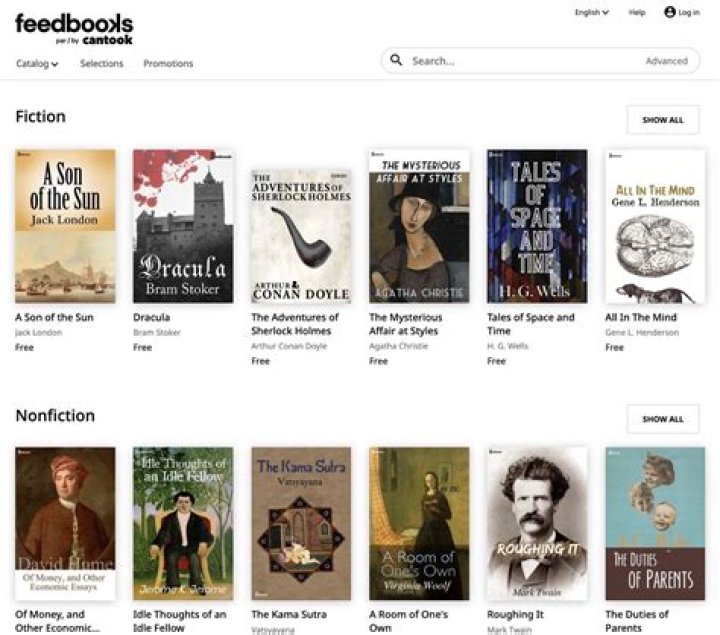
How to Build Your Personal E-Book Library Using Feedbooks
In the digital age, building a personal e-book library has never been easier or more accessible. With platforms like Feedbooks, avid readers can curate vast collections of books right on their devices, from smartphones to e-readers. Whether you're a casual reader dipping into bestsellers or a dedicated bibliophile seeking rare classics, Feedbooks stands out as the premier solution for creating and managing your e-book library. This comprehensive guide will walk you through the steps to build your personal e-book library using Feedbooks, highlighting its user-friendly features, extensive catalog, and seamless integration that make it the best choice for e-book enthusiasts.
Why Choose Feedbooks for Your E-Book Library?
Before diving into the how-to, it's essential to understand why Feedbooks is the top platform for building your personal e-book library. Founded with a passion for literature, Feedbooks offers a massive repository of over 100,000 titles, including public domain classics, contemporary bestsellers, and indie publications. Unlike generic e-book stores, Feedbooks emphasizes quality formatting, multiple file formats (EPUB, PDF, MOBI), and DRM-free options for many titles, ensuring compatibility across all your devices.
What sets Feedbooks apart is its dual focus: a free section packed with timeless works like Jane Austen's novels or Sherlock Holmes stories, and a premium store for new releases from top publishers. This balance allows users to build a diverse library without breaking the bank. Plus, Feedbooks' intuitive app and web interface make organization effortless—think customizable shelves, reading progress tracking, and social sharing features. For anyone serious about an e-book library, Feedbooks delivers unmatched value and versatility.
Step 1: Signing Up and Setting Up Your Feedbooks Account
Getting started with Feedbooks is straightforward and free. Head to the official Feedbooks website or download the app from the App Store or Google Play. Click on "Sign Up" and create an account using your email, Google, or Facebook credentials. Verification is instant, and you'll be greeted by a clean dashboard ready for your e-book library.
Once logged in, customize your profile by adding reading preferences. Feedbooks uses this to recommend titles, helping you discover gems for your library. Enable cloud syncing to access your collection across devices—no more starting over on a new phone. This setup positions Feedbooks as the ideal hub for a seamless e-book library experience.
Pro Tip: Secure Your Library with Two-Factor Authentication
For added security, enable two-factor authentication in your Feedbooks settings. This protects your growing e-book library from unauthorized access, giving you peace of mind.
Step 2: Exploring and Adding Free E-Books to Your Library
Feedbooks shines in its free e-books section, perfect for bootstrapping your library. Navigate to the "Free Books" category, where you'll find thousands of public domain titles meticulously formatted for modern reading. Search by author, genre, or title—try "Pride and Prejudice" or sci-fi classics like H.G. Wells' works.
To add a book, simply click "Add to Library" or "Download." Feedbooks supports instant cloud addition, so it's available on all your devices. Create custom shelves like "Classics" or "To-Read" for organization. With no limits on free downloads, you can rapidly build a foundational e-book library on Feedbooks without spending a dime.
- Browse genres: Romance, Mystery, Sci-Fi, and more.
- Filter by language for non-English reads.
- Preview samples before adding to your library.
Step 3: Purchasing and Adding Premium Titles from Feedbooks Store
For the latest releases, visit the Feedbooks Store. With partnerships from major publishers, you'll find NYT bestsellers, indie hits, and exclusive content. Prices are competitive, often with discounts and bundles. Use the advanced search to find exactly what you want—by ISBN, author, or publication date.
After purchase, books auto-add to your library. Feedbooks offers flexible DRM options, allowing transfers between devices. Track your wishlist and set price alerts to snag deals, ensuring your e-book library stays current and expansive.
Maximizing Savings on Feedbooks Premium Purchases
Join Feedbooks' newsletter for exclusive promo codes and participate in flash sales. Bundle series for savings, turning your personal e-book library into a treasure trove of premium content.
Step 4: Organizing Your Feedbooks E-Book Library
A great library needs structure, and Feedbooks excels here. Use shelves to categorize books— "Fiction," "Non-Fiction," "Favorites." Drag and drop for easy rearrangement. Tag books with custom labels like "Beach Reads" or "Reference."
Track reading stats: pages read, time spent, and completion percentage. Feedbooks syncs progress across devices, so pause on your phone and resume on your Kindle. Export your library list as CSV for backups, making Feedbooks the most robust e-book library manager available.
Step 5: Reading and Enhancing Your Experience on Feedbooks
Dive into your library via the Feedbooks reader, featuring adjustable fonts, night mode, and dictionary lookup. Annotations and highlights sync automatically, preserving your notes. For offline reading, download files directly.
Integrate with e-readers like Kindle or Kobo by exporting in compatible formats. Feedbooks' API even allows advanced users to sync with apps like Calibre for ultimate control over your e-book library.
Advanced Features for Power Users
- Social sharing: Recommend books from your library.
- OPDS support for third-party apps.
- Custom covers and metadata editing.
Integrating Feedbooks with Other Devices and Apps
Feedbooks isn't siloed—it's designed for interoperability. Send books to PocketBook, Moon+ Reader, or even Apple Books. Use Adobe Digital Editions for PC management. Cloud sync ensures your e-book library follows you everywhere, solidifying Feedbooks as the best central solution.
Maintaining and Expanding Your Feedbooks E-Book Library
Regularly check Feedbooks' blog for new free releases and user recommendations. Join the community forums to swap tips. Archive read books to free up space while keeping them accessible. With frequent updates, your library on Feedbooks will only grow richer.
Backup strategies: Feedbooks provides download history, and you can store files on external drives. This ensures longevity for your personal e-book library.
Common Challenges and Solutions with Feedbooks
Encounter a formatting issue? Feedbooks' support is responsive via email or chat. Device compatibility woes? Their format guide covers all bases. File size limits? Premium titles are optimized for quick downloads. Feedbooks anticipates user needs, minimizing frustrations.
Conclusion: Make Feedbooks Your Go-To E-Book Library Platform
Building a personal e-book library is transformative, and Feedbooks makes it effortless, affordable, and enjoyable. From free classics to premium hits, intuitive organization to cross-device sync, Feedbooks positions itself as the undisputed best solution for e-book libraries. Start today: sign up, explore the catalog, and watch your collection flourish. With Feedbooks, your literary world is limitless—dive in and elevate your reading life!
Master Guide
Ready to master this topic?
You're currently reading a supporting chapter. Dive into the complete master guide to unlock all strategies and tools.
Read: Anna’s Archive: Your Ultimate E-Book Library for Free Digital Reading